
Home Internet Service Types Explained: Fiber, Cable, DSL, Fixed Wireless, and Satellite

Key Takeaways
Home Internet Service Types
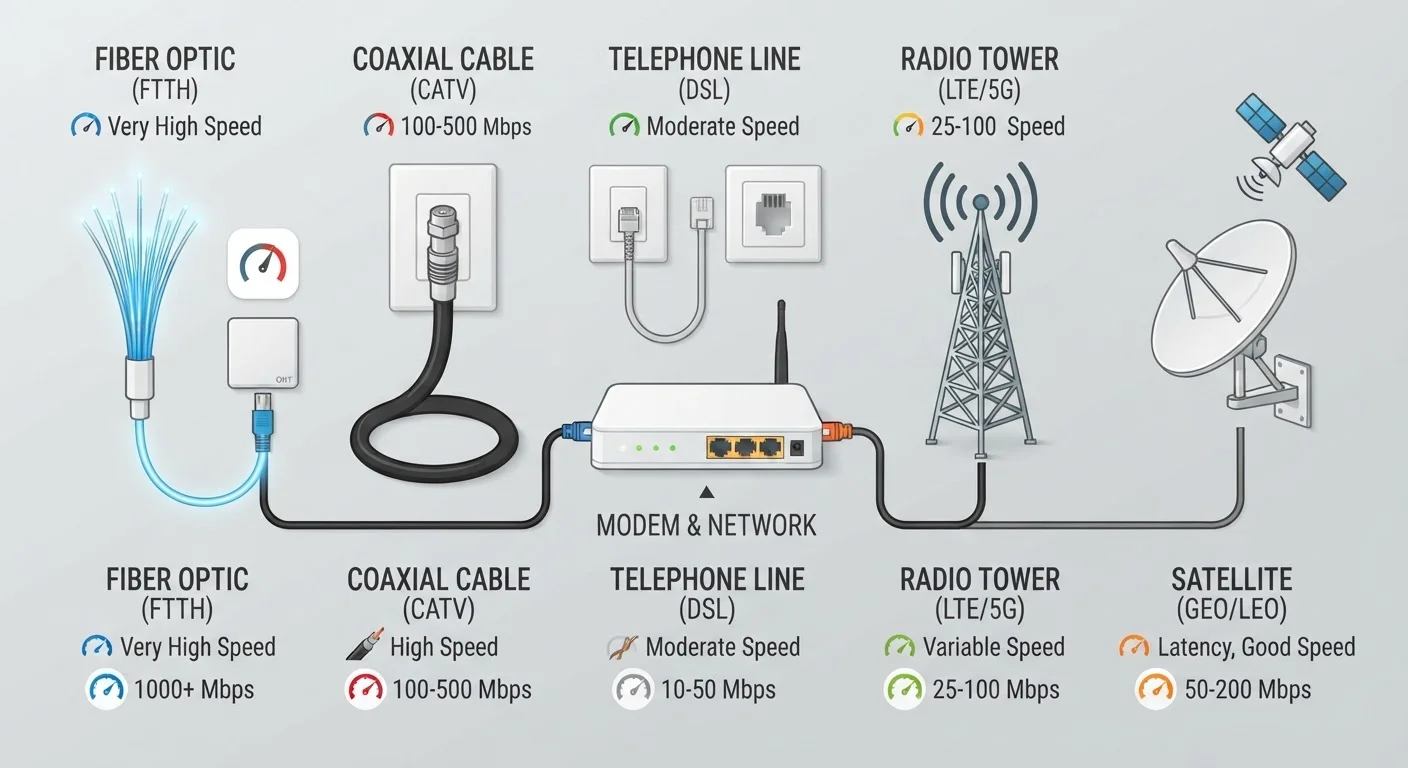
Home internet service is delivered through several distinct technologies, each using different physical or wireless infrastructure to carry data to your home. The five main types in the U.S. are fiber, cable, DSL, fixed wireless, and satellite. Each differs in speed potential, reliability, latency, and geographic availability - and ISP marketing rarely explains those differences clearly.
The technology type determines your connection's theoretical ceiling for speed and latency, independent of the plan tier you purchase. Knowing your connection type is foundational before comparing any plan or price.
Fiber-Optic Internet: Light-Speed Data Transmission
Fiber-optic internet transmits data as pulses of light through thin glass or plastic strands. Because light doesn't degrade over distance the way electrical signals do, fiber maintains its speed and signal integrity from the provider's equipment to your home - a configuration often called FTTH or FTTP.
The practical advantages are significant. Fiber connections are typically symmetrical, meaning upload and download speeds are equal - important for video conferencing, cloud backups, and remote work. Latency is low, and because the connection isn't shared with neighbors in the same way cable is, performance stays stable during peak hours. The main limitation is availability: fiber infrastructure requires substantial investment to build, so it remains concentrated in cities and newer suburbs.
For a deeper look at how fiber behaves differently from cable in real-world conditions, see Fiber vs. Cable Internet: The Real Differences Beyond the Marketing.
Cable Internet: Fast Downloads, Shared Infrastructure
Cable internet uses the same coaxial cable network originally built for TV service. It's widely available across suburban and many urban areas, and it delivers download speeds that compete with entry-level fiber plans.
The key structural difference is that cable runs on a shared network node. Multiple households in a neighborhood connect through the same local line, which means bandwidth is a shared resource. This is why cable connections often slow down during evenings when many users are online simultaneously - a phenomenon explained in more depth in our article on why your home internet slows down at night.
Cable also has an asymmetrical design by default: download speeds are much higher than upload speeds. This is rarely a problem for streaming, but it can be a bottleneck for households with frequent video calls or large file uploads.
~43%
U.S. homes with access to fiber internet
According to FCC Broadband Data Collection reports, fiber availability has expanded significantly but still leaves the majority of U.S. locations without a fiber option.
600+ ms
Typical latency for geostationary satellite
Geostationary satellite's orbital distance of roughly 22,000 miles creates unavoidable signal round-trip delays, limiting suitability for real-time applications.
~19 million
Americans lacking access to fixed broadband
The FCC has identified millions of U.S. locations - concentrated in rural and tribal areas - where no wired broadband option meeting basic speed thresholds is available.
DSL: Broad Reach, Modest Speeds
DSL delivers internet over the existing copper telephone network. Because telephone lines already reach most U.S. addresses, DSL has broader geographic coverage than fiber or cable - it's often the only wired option in less-dense areas.
The trade-off is performance. DSL speeds depend heavily on your distance from the provider's equipment: the farther away you are, the slower your connection. Practical download speeds often range from a few megabits per second to around 100 Mbps on newer VDSL variants, well below what fiber or cable can deliver. For households with lighter internet use - email, basic browsing, and standard-definition streaming - DSL can still be a functional option where no alternatives exist.
Fixed Wireless: Connecting Without Physical Lines
Fixed wireless internet delivers service via radio signals transmitted from a nearby tower to an antenna installed on your home. Unlike mobile data, fixed wireless is designed specifically for stationary home use with equipment pointed at a fixed signal source.
Performance varies widely depending on distance to the tower, terrain, tree cover, and how many users share the tower's capacity. In favorable conditions - clear line-of-sight and low tower congestion - fixed wireless can deliver speeds comparable to DSL or even low-tier cable. It's become an increasingly important option in rural and suburban areas where running cable or fiber is economically unfeasible for providers.
Satellite Internet vs. Fixed Wireless explores the specific trade-offs between these two technologies for underserved households.
Check Infrastructure, Not Just Advertised Speed
When evaluating a fixed wireless plan, ask the provider about tower distance, capacity, and whether the plan includes data caps. Unlike fiber or cable, fixed wireless performance is highly location-specific - a neighbor's experience may differ significantly from yours depending on antenna placement and local terrain.
Satellite Internet: Nationwide Coverage, Distinct Trade-Offs
Satellite internet reaches virtually any location with a clear view of the sky by bouncing signals between a dish at your home and an orbiting satellite. Traditional geostationary satellites orbit roughly 22,000 miles above Earth, which introduces round-trip signal delays - called latency - of 600 milliseconds or more. That makes real-time applications like video gaming or voice calls noticeably sluggish.
Low-Earth orbit (LEO) satellite services operate at much lower altitudes, reducing latency to 20-80 milliseconds in many conditions. This has made satellite a more practical option for a wider range of uses, though it still tends to be more expensive than comparable wired services and can be affected by weather and network congestion.
Understanding how speed numbers are marketed across all these service types is important context - see Common Myths About Home Internet Speeds That ISPs Let Slide for a plain-language breakdown.
Choosing Based on What's Actually Available
ISP marketing tends to emphasize speed tiers and promotional pricing rather than the underlying technology - but the connection type you have shapes every aspect of your experience, from how fast pages load to whether video calls drop. Before evaluating any plan, the practical first step is checking which technologies actually serve your address.
Once you know your options, consider factors beyond advertised speed: upload symmetry matters for remote work, latency matters for gaming and calls, and network congestion patterns matter for households that use the internet during peak evening hours. Our guide to what Mbps actually means for daily use can help translate speed numbers into practical expectations.
If you're evaluating a new provider, it's also worth reviewing contract terms carefully. The ISP Contract Fine Print Most Households Never Read explains the clauses - data caps, price-lock periods, early termination fees - that most consumers discover only after signing.
A household in a dense urban neighborhood has access to a fiber-optic provider and a cable provider. Both offer 500 Mbps plans at similar prices.
A family moves to a rural property 12 miles outside a small town and discovers their only wired internet option is DSL from a local phone company.
A remote worker begins experiencing video call dropouts and slow file uploads despite having a cable plan advertised at 300 Mbps download.