

Key Takeaways
Option A
Fiber Internet
The newer, symmetrical-speed infrastructure built for consistency.
Best for: Households that upload frequently, work from home, or want predictable speeds regardless of neighborhood demand.
Option B
Cable Internet
The widely available, high-download option built on existing coaxial lines.
Best for: Consumers in areas without fiber access who primarily stream and browse, and where upload speed is a secondary concern.
If you video conference, upload large files, or run a home office
Fiber Internet
Symmetrical speeds mean your upload bandwidth matches your download, preventing the stuttering and slowdowns that asymmetric cable connections cause during video calls and cloud backups.
If fiber isn't available in your area
Cable Internet
Cable remains a capable option for streaming, browsing, and gaming for most households - understanding its limitations helps you manage expectations rather than being surprised by peak-hour slowdowns.
If you have multiple heavy users streaming and gaming simultaneously
Fiber Internet
Fiber's dedicated connection and consistent speeds hold up better under simultaneous high-demand use compared to a shared cable node.
If you primarily stream video and browse the web with light upload needs
Cable Internet
For download-heavy use patterns, cable's high download tiers can serve most households adequately, especially where fiber isn't yet available.
How the Two Technologies Actually Work
The clearest way to understand fiber versus cable internet is to start with the physical infrastructure - because every real-world difference flows from it.
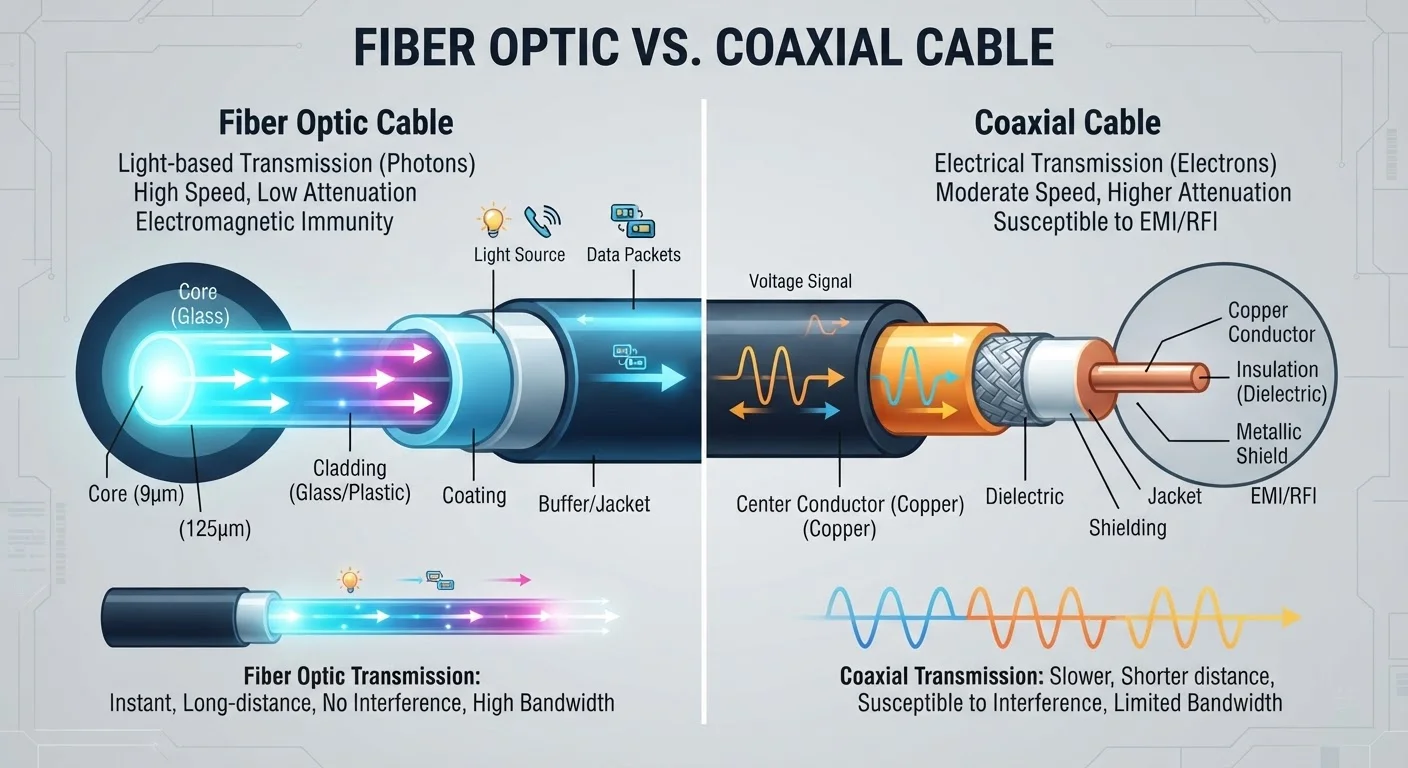
Fiber optic internet transmits data as pulses of light through thin glass or plastic strands. Light doesn't degrade over distance the way electrical signals do, and fiber lines are dedicated rather than shared with your immediate neighbors. The result is a connection that behaves consistently whether it's 2 p.m. or 8 p.m. on a Tuesday.
Cable internet sends data as electrical signals over coaxial cable - the same infrastructure originally built to deliver television. Coaxial lines in a neighborhood connect to a shared node, meaning the available bandwidth is distributed among everyone on that node simultaneously. This architecture is capable of very high download speeds, but it introduces a variable that fiber avoids: neighborhood congestion.
For a broader overview of how these and other connection types compare at a structural level, see our guide to home internet service types.
| Criterion | Fiber Internet | Cable Internet |
|---|---|---|
| Transmission medium | Light pulses through glass/plastic fiber | Electrical signals over coaxial cable |
| Upload vs. download speeds | Symmetrical (equal up and down) | Asymmetrical (upload much lower) |
| Shared neighborhood bandwidth | No - dedicated connection | Yes - shared node with neighbors |
| Peak-hour congestion risk | Low | Moderate to high, varies by area |
| Typical U.S. availability | ~40-55% of U.S. households | ~85-90% of U.S. households |
| Best use case | Remote work, heavy uploading, multi-user homes | Streaming, browsing, download-heavy use |
The Upload Speed Gap That Marketing Glosses Over
ISP advertising almost always leads with download speed - and for good reason. Download speeds sound impressive. But upload speed is where fiber and cable diverge most sharply, and it matters more than most consumers realize until they need it.
Fiber connections are symmetrical: a 500 Mbps fiber plan typically delivers 500 Mbps both down and up. Cable plans are asymmetrical by design. A cable plan advertised at 500 Mbps download might offer only 20-35 Mbps upload, sometimes less depending on the provider's network configuration.
That gap is largely invisible if your household primarily streams video and browses websites - both are download-heavy activities. It becomes noticeable during video calls (which require continuous upload), backing up photos to the cloud, sharing large files, or live streaming. A household with one or two remote workers can find cable's upload ceiling genuinely limiting during business hours.
~10-35 Mbps
Typical cable upload speed on high-tier plans
While download tiers on cable can reach 500-1,000 Mbps, upload allocations on many plans remain a fraction of that, based on general industry plan structures.
~40-55%
U.S. homes with fiber internet access
Fiber coverage varies significantly by source and continues to expand; urban and suburban areas have the highest penetration rates.
Up to 20%
Speed drop during peak evening hours on cable
FCC Measuring Broadband America reports have documented measurable cable speed reductions during peak periods compared to off-peak baselines.
The common myths about home internet speeds piece unpacks how advertised speed tiers relate - and don't relate - to what your connection actually delivers under load.
Congestion, Consistency, and What 'Up to' Really Means
Both fiber and cable providers advertise speeds as "up to" a given number. That qualifier does real work. For fiber, the gap between advertised and delivered speeds tends to be narrow because fiber lines aren't shared at the neighborhood level. For cable, that gap can widen significantly during peak usage hours - typically evenings and weekends - when many subscribers on the same node are active simultaneously.
This isn't a flaw that cable providers can simply advertise away. It's a structural characteristic of how cable networks allocate capacity. Providers have invested in expanding node capacity over time, and a well-maintained cable network in a low-density area may perform much more consistently than an older one in a densely populated neighborhood. But consumers on cable generally have less predictability than those on fiber.
Why 'Gigabit' Doesn't Always Mean What It Sounds Like
Both fiber and cable providers now advertise gigabit-tier plans, which can sound equivalent. The distinction is that a gigabit fiber plan typically means 1,000 Mbps in both directions. A gigabit cable plan usually means 1,000 Mbps download with upload speeds far below that - sometimes as low as 35 Mbps on older DOCSIS infrastructure. Always check the upload speed, not just the headline download figure, before comparing plans.
If you want to know whether your connection is actually delivering what you're paying for - regardless of type - testing your actual speeds at different times of day is the most direct evidence available.
Availability: The Factor That Often Decides for You
In an ideal comparison, every consumer would weigh fiber against cable on equal footing and choose. In practice, availability often narrows the choice considerably. Fiber infrastructure requires laying new physical lines - an expensive, time-consuming process - so buildout has concentrated in urban and suburban markets, with many rural and lower-density areas still outside its reach.
Estimates from industry and regulatory sources suggest that somewhere between 40% and 55% of U.S. households have access to at least one fiber provider, though precise figures vary by methodology and change as buildout continues. Cable, by contrast, passes the vast majority of U.S. homes because the coaxial infrastructure was already in place from the cable television era.
If fiber is available at your address, the question becomes whether the pricing and contract terms make sense for your household's actual usage patterns. If it isn't available, cable is generally a more capable option than DSL or fixed wireless for high-bandwidth households - though those alternatives are worth understanding too. Our comparison of satellite and fixed wireless covers the landscape for homes that cable has largely passed over.